![[object Object]](https://s3.us-west-2.amazonaws.com/worklenz.com/assets/worklenz-light-mode.png)
![[object Object]](https://s3.us-west-2.amazonaws.com/worklenz.com/assets/worklenz-dark-mode.png)
How to log time using the timer
In Worklenz, you can log time using the built-in timer. This is important for measuring task time and predicting the entire project duration.
You have a few ways to log time in Worklenz:
1. Using the Task Drawer
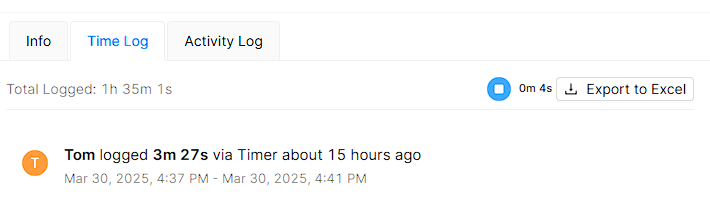
Open the task drawer by clicking the Open option on a task in the task list. Navigate to the Time Log tab located below the task name. Then click the Play button (Start Timer) to start the timer. Once the task is done, click the Stop button to stop the timer. Your time will be automatically recorded in the Time Log list.
2. Using the Task List View
You can also log time for a particular task directly from the task list view. Click the Timer icon in the Time Tracking column, then click the Start Timer button to begin tracking. Click the Stop button to stop the timer. The logged time will also appear in the task drawer’s Time Log tab alongside entries recorded using the first method.
3. Using the Recent Timer Log
Click the Timer icon on the top-left corner of the screen, next to your profile icon. This will open a list of your recently time-logged tasks. From here, you can start the timer directly for any of those tasks without navigating to the task itself. Only tasks that have been previously time-logged will appear in this list.