![[object Object]](https://s3.us-west-2.amazonaws.com/worklenz.com/assets/worklenz-light-mode.png)
![[object Object]](https://s3.us-west-2.amazonaws.com/worklenz.com/assets/worklenz-dark-mode.png)
How to create a status
How to create a status
You can add new statuses under the three main categories: To do, Doing, and Done.
- Click the Group by dropdown in the task list and select Status.
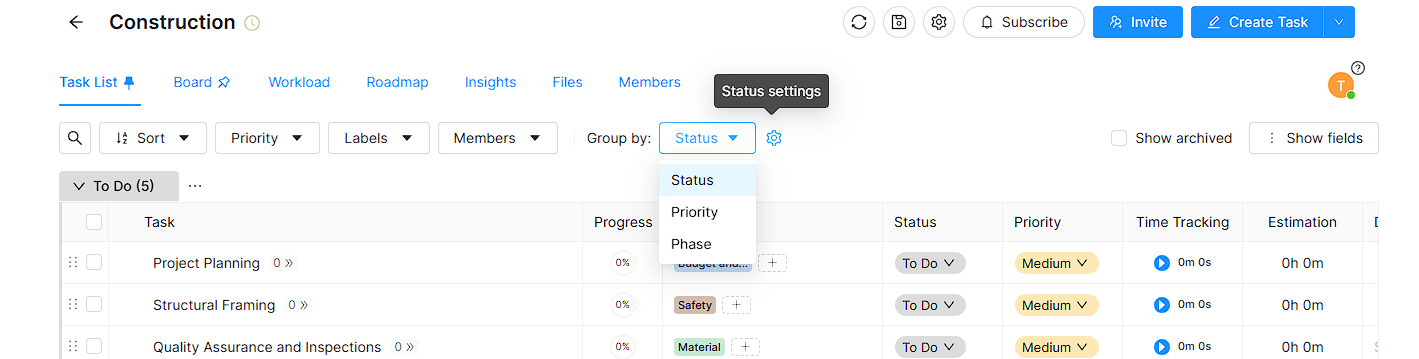
- Click the settings icon next to the dropdown.
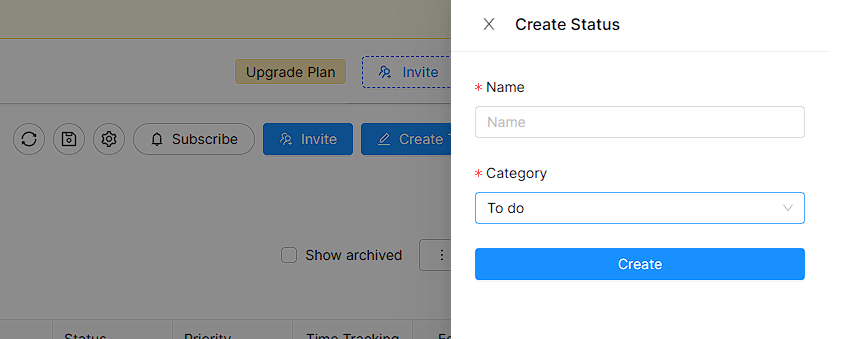
- The Create status drawer will open on the left side.
- Enter the new status name in the Name field.
- Select the category for the new status from the Category dropdown.
- Click the Create button.
Once created, the new status will appear in the task list and will be available in all status dropdowns across the project.