![[object Object]](https://s3.us-west-2.amazonaws.com/worklenz.com/assets/worklenz-light-mode.png)
![[object Object]](https://s3.us-west-2.amazonaws.com/worklenz.com/assets/worklenz-dark-mode.png)
Bulk update
Bulk Update Tasks
Managing a large number of tasks individually can be time-consuming. Worklenz simplifies this process by providing a bulk update feature, allowing you to update multiple tasks simultaneously.
We can update our task as the main three-way
-
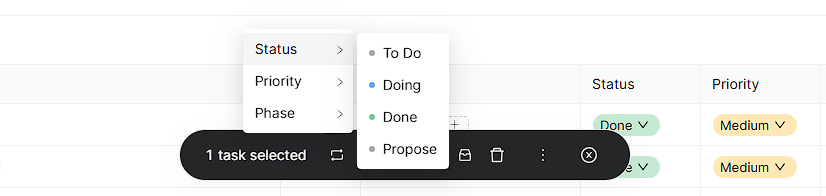
Changing the Status of the task
- You can select multiple task in the task list
- Then it will open the option bar bottom of the page
- Click Change icon
- After the given list, select the status option
- It will show the status list in your project
- Click any status, and it will apply to the selected tasks
-
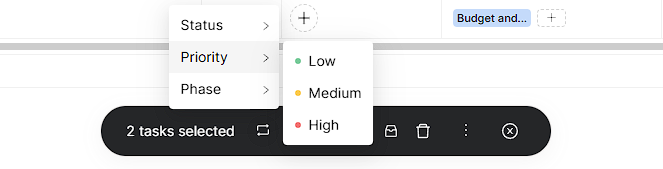
Changing the Priority of the task
- You can select multiple task in the task list
- Then it will open the option bar bottom of the page
- Click Change icon
- After the given list, select the Priority option
- It will show the Priority list in your project
- Click any Priority and it will apply to the selected tasks
-
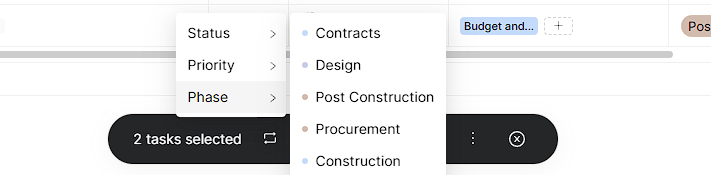
Changing Phase of the task
- You can select multiple task in the task list
- Then it will open the option bar bottom of the page
- Click Change icon
- After the given list, select the Phase option
- It will show the Phase list in your project
- Click any Phase and it will apply to the selected tasks
This feature enables you to efficiently manage and update multiple tasks in just a few clicks, improving your workflow and saving valuable time.