![[object Object]](https://s3.us-west-2.amazonaws.com/worklenz.com/assets/worklenz-light-mode.png)
![[object Object]](https://s3.us-west-2.amazonaws.com/worklenz.com/assets/worklenz-dark-mode.png)
Bulk Delete
Bulk Deleting Tasks
Managing a large number of tasks individually can be time-consuming. Worklenz simplifies this process by providing a bulk delete feature, allowing you to remove multiple tasks simultaneously.
To use the bulk delete feature:
- Navigate to the desired project where your tasks are located.
- You will see checkboxes beside each task in the task table. You can:
- Select individual tasks using their respective checkboxes, or
- Use the checkbox at the top of the table to select all tasks at once.
- Once one or more tasks are selected, an action bar will appear at the bottom of the page.
- In the action bar, click the Delete icon.
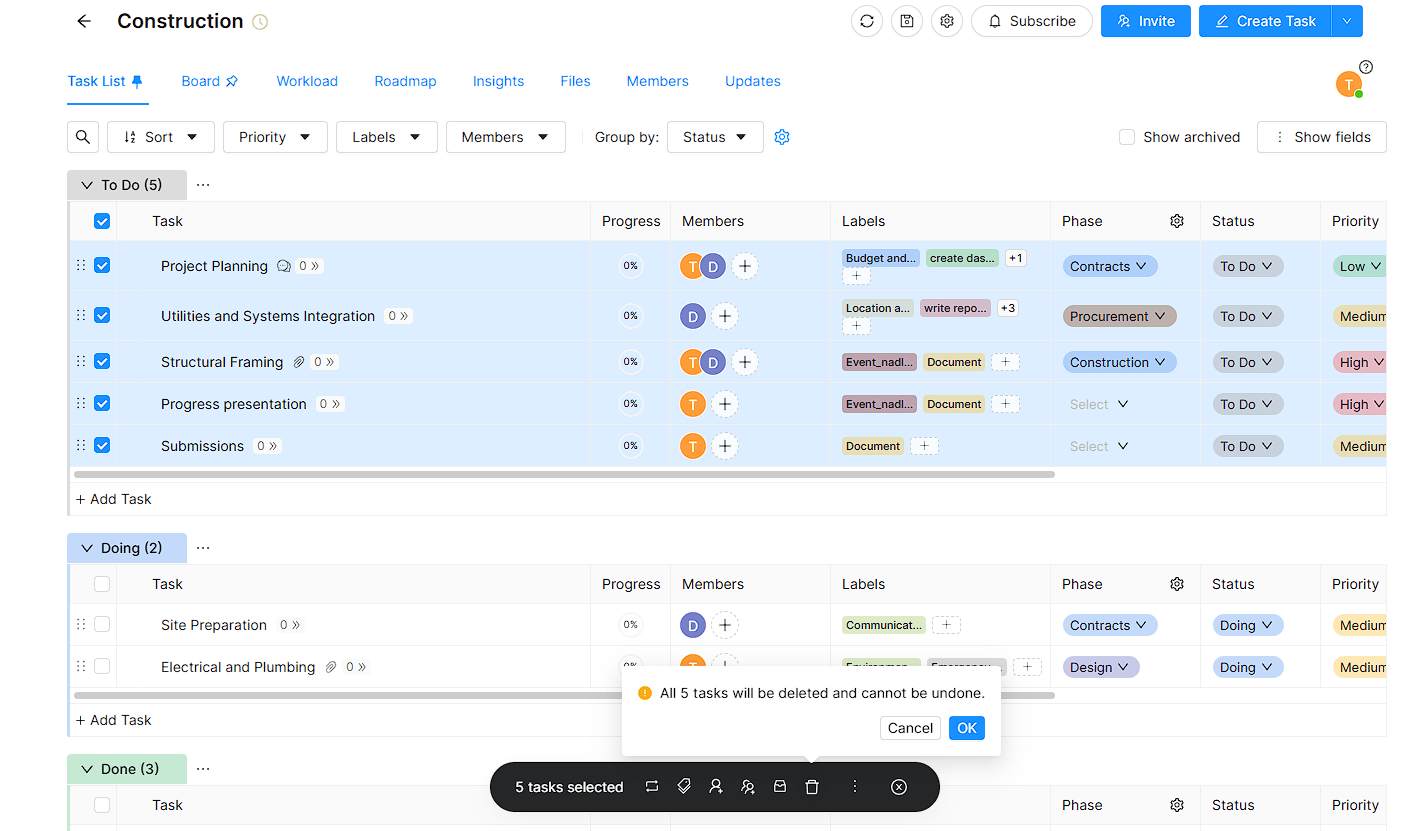
- A confirmation dialog will appear, asking you to confirm the deletion.
- Choose OK to proceed with deleting the selected tasks, or click Cancel to abort the action.
This feature enables you to efficiently manage and remove multiple tasks in just a few clicks, improving your workflow and saving valuable time.