![[object Object]](https://s3.us-west-2.amazonaws.com/worklenz.com/assets/worklenz-light-mode.png)
![[object Object]](https://s3.us-west-2.amazonaws.com/worklenz.com/assets/worklenz-dark-mode.png)
Bulk Add Labels
Bulk Adding Labels to Tasks
Labeling tasks individually can be inefficient, especially when you need to assign the same label to multiple tasks. Worklenz offers a bulk add labels feature that allows you to efficiently apply common labels to several tasks at once.
To add labels in bulk:
- Navigate to the desired project where your tasks are listed.
- Select the tasks you want to label:
- Use the checkboxes next to individual tasks, or
- Use the checkbox at the top of the task table to select all tasks.
- Once tasks are selected, an action bar will appear at the bottom of the page.
- Click the Change Label icon in the action bar.
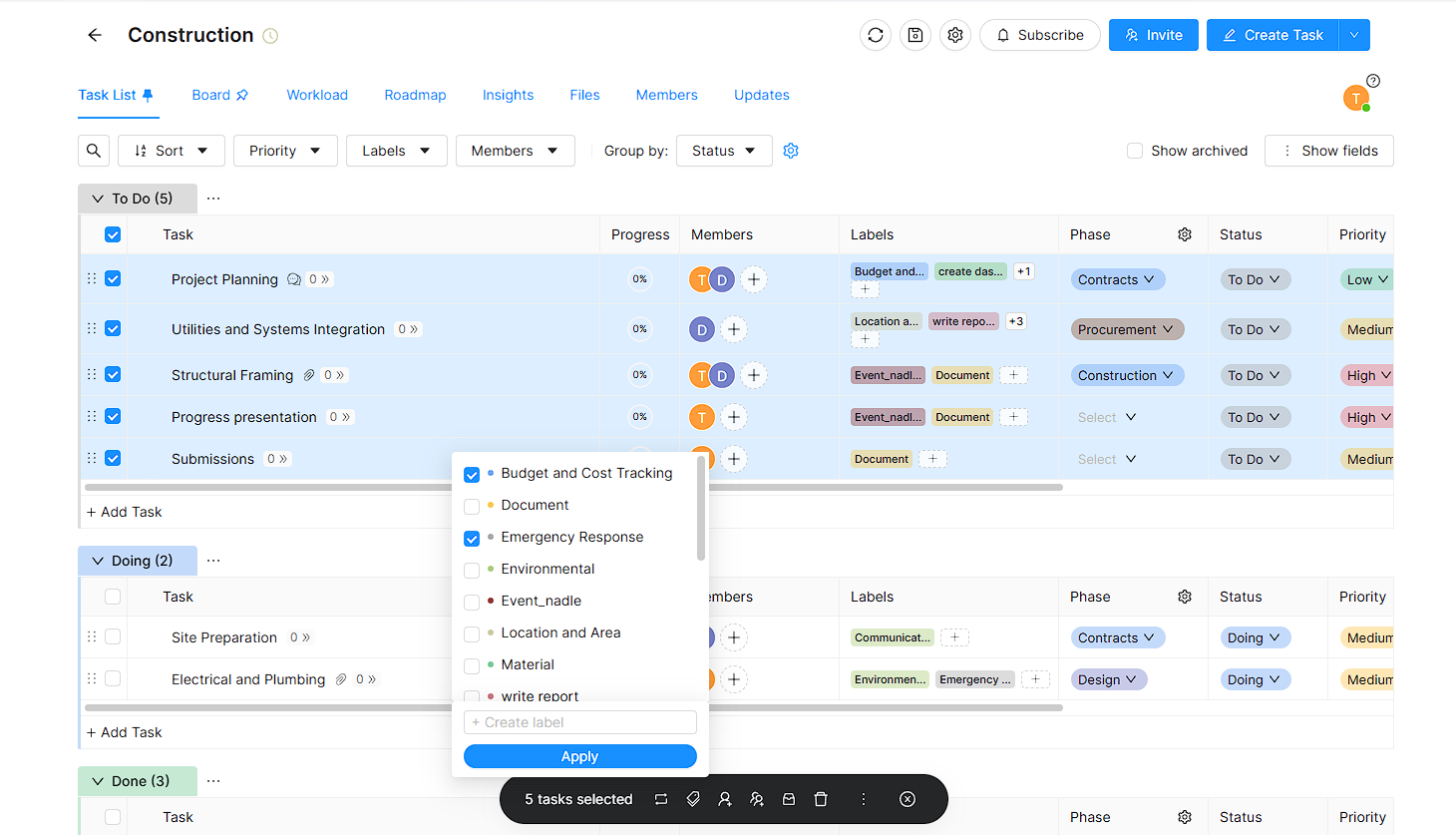
- A dropdown will appear showing the list of existing labels.
- You can:
- Select one or more existing labels to assign to the selected tasks, or
- Create a new label using the Create Labels input box.
- Click the Apply button to confirm and apply the selected labels to all chosen tasks.
This feature simplifies task management by allowing you to efficiently categorize and organize tasks in bulk.